| Ver tema anterior :: Ver tema siguiente |
| Autor |
Mensaje |
Orio 

Registrado: 24 Feb 2007
Mensajes: 29545
Ubicación: West Emilia
Expire: 2012-12-04
|
 Publicado: Lun Sep 28, 2009 1:20 pm Asunto: Free "zeissifiers" actions |
|
Publicado: Lun Sep 28, 2009 1:20 pm Asunto: Free "zeissifiers" actions |
|
|
Orio wrote:
I have made a set of seven "zeissifiers" actions, for Photoshop CS2 and above.
They are numbered 1 to 6 in increasing power order, plus a "super" action with extreme settings.
There is a "caveat" (warning) of use, please read the license text, everything is explained.
The actions are free for use and redistribution, as long as the license text is included. So enjoy 
Download:
http://www.oriofoto.net/temp/orio_microcontrast_cs2_actions.zip
P.S. Attila it would be good if you could host the actions on your server too. Every now and then I make room in my server so the actions might not be up for download indefinitely.
_________________
Orio, Administrator
T*
NE CEDE MALIS AUDENTIOR ITO
Ferrania film is reborn! http://www.filmferrania.it/
Support the Ornano film chemicals company and help them survive!
http://forum.mflenses.com/ornano-chemical-products-t55525.html |
|
| Volver arriba |
|
 |
Orio
Registrado: 24 Feb 2007
Mensajes: 29545
Ubicación: West Emilia
Expire: 2012-12-04
|
Publicado: Lun Sep 28, 2009 1:25 pm Asunto: |
|
Publicado: Lun Sep 28, 2009 1:25 pm Asunto: |
|
|
Orio wrote:
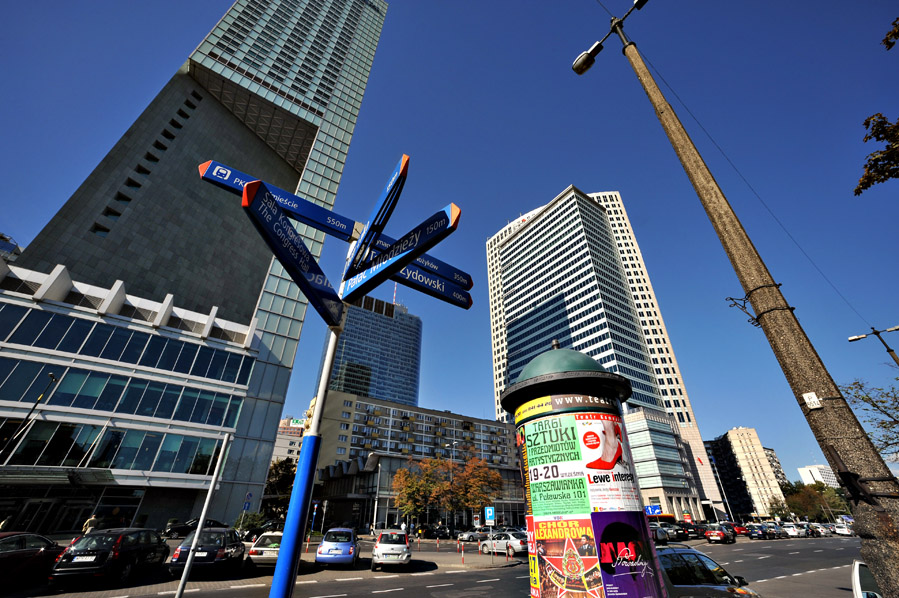
Here's a demo of the actions' effect.
I used one of the Samyang 2.8/14mm sample images, I hope that the author does not complain, after all it will promote the lens I think 
The original Samyang image is at :
http://www.fotopolis.pl/index.php?n=9606&p=1
First the original image, then the "zeissified" version:
Samyang original (resized):

Samyang "zeissified" 
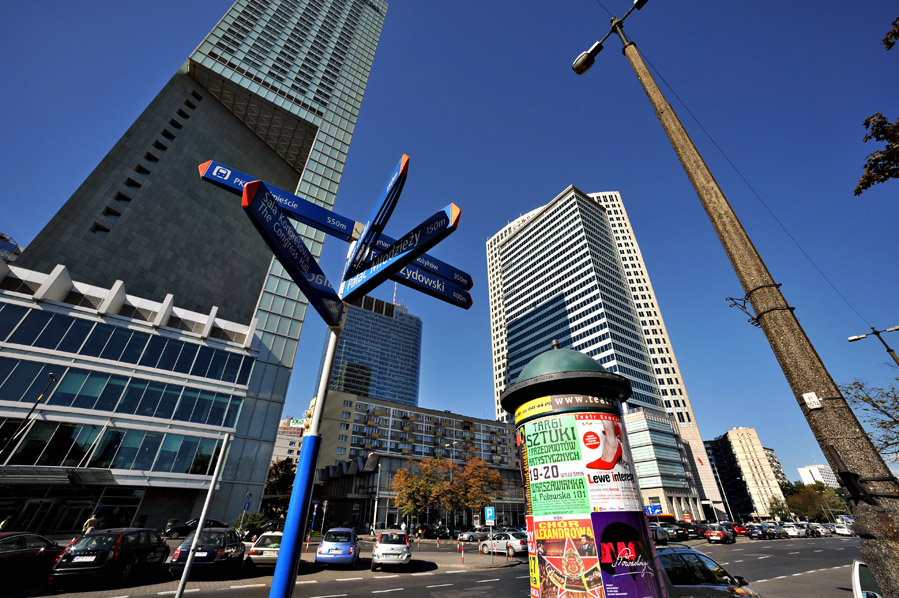
On the landscape part, only the "zeissifier" was applied. No further sharpening, no further saturation.
On the sky part, I applied some saturation in order to make the sky match the landscape (which got saturated by the action).
_________________
Orio, Administrator
T*
NE CEDE MALIS AUDENTIOR ITO
Ferrania film is reborn! http://www.filmferrania.it/
Support the Ornano film chemicals company and help them survive!
http://forum.mflenses.com/ornano-chemical-products-t55525.html |
|
| Volver arriba |
|
|
Farside

Registrado: 01 Sep 2007
Mensajes: 6579
Ubicación: Ireland
Expire: 2013-12-27
|
Publicado: Lun Sep 28, 2009 2:00 pm Asunto: |
|
Publicado: Lun Sep 28, 2009 2:00 pm Asunto: |
|
|
Farside wrote:
Thanks for that, Orio.
Saves me having to buy some of that Zeiss glass
_________________
Dave - Moderator
Camera Fiend and Biograph Operator
If I wanted soot and whitewash I'd be a chimney sweep and house painter.
The Lenses of Farside (click)
BUY FRESH FOMAPAN TO HELP KEEP THE FACTORY ALIVE ---
Foma Campaign topic -
http://forum.mflenses.com/foma-campaign-t55443.html
FOMAPAN on forum -
http://www.mflenses.com/fs.php?sw=Fomapan
Webshop Norway
http://www.fomafoto.com/
Webshop Czech
https://fomaobchod.cz/inshop/scripts/shop.aspx?action=DoChangeLanguage&LangID=4 |
|
| Volver arriba |
|
|
poilu
Registrado: 26 Ago 2007
Mensajes: 10476
Ubicación: Greece
Expire: 2019-08-29
|
Publicado: Lun Sep 28, 2009 2:16 pm Asunto: |
|
Publicado: Lun Sep 28, 2009 2:16 pm Asunto: |
|
|
poilu wrote:
nice plugin, now everyone can feel 'zeissified' ! |
|
| Volver arriba |
|
|
Spotmatic
Registrado: 18 Ago 2008
Mensajes: 4045
Ubicación: Netherlands
|
Publicado: Lun Sep 28, 2009 2:35 pm Asunto: |
|
Publicado: Lun Sep 28, 2009 2:35 pm Asunto: |
|
|
Spotmatic wrote:
Great! Now I'll also wait for the "bokeh monster" plugin and the "swirly bokeh" one
_________________
Peter - Moderator
Pentax K-5 + Pentax 645 + Canon 5D + Bessa RF 10,5cm Heliar, and a 'little' bag full of MF lenses. The lens list is * here *.
My fast 80s: Asahi-Kogaku Takumar 83mm f/1.9 - Super-Takumar 85mm f/1.9 - FA 77mm f/1.8 Limited - Cyclop 85/1.5 (Helios-40 innards) - Komura 80mm f/1.8 - Meyer Görlitz Primoplan 7,5cm 1:1.9 - Carl Zeiss Jena 80mm f/1.8 Pancolar - Canon 85mm f/1.8 S.S.C. - Canon 85mm f/1.2 S.S.C. Aspherical |
|
| Volver arriba |
|
|
my_photography
Registrado: 03 Nov 2008
Mensajes: 2772
Ubicación: Pearl of the Orient
Expire: 2016-12-25
|
Publicado: Lun Sep 28, 2009 2:50 pm Asunto: |
|
Publicado: Lun Sep 28, 2009 2:50 pm Asunto: |
|
|
my_photography wrote:
Thanks Orio. I like zeiss.
_________________
Zeiss: CJZ Flektogon 20/2.8, CJZ Flektogon 20/4, , CJZ Pentacon 29/2.8, CJZ Flektogon 35/2.4, CJZ Pancolar 50/1.8, Tessar 50/2.8, Biotar 7.5cm/1.5, CJZ Pancolar 80/1.8, CJZ Sonnar 135/3.5, CJZ Pentacon 135/2.8 CJZ Sonnar 200/2.8
Other Germany: Meyer Primoplan 50/1.8, Meyer Trioplan 100/2.8
Takumar: SMC 50/1.4 Super Tak 55/2, Super Tak 85/1.9, S-M-C 135/3.5, Super Tak 150/4
Russian: Zenith 16/2.8, Mir-24M 2/35, Volna-9 50/2.8, Helios 44M (58/2), Helios 44M-3 MC (58/2), Helios 40 (85/1.5), Tair 11A (135/2.8 )
Others: Sears 28/2.8, Sankor 35/2.8, Enna M�nchen Tele-Ennalyt 135/3.5
Zoom Sigma Zoom 28-85/3.5-4.5
|
|
| Volver arriba |
|
|
dakoo


Registrado: 08 Mar 2008
Mensajes: 603
|
Publicado: Mar Sep 29, 2009 9:18 am Asunto: |
|
Publicado: Mar Sep 29, 2009 9:18 am Asunto: |
|
|
dakoo wrote:
Great was imagining some should do it..
Am glad it comes from you Orio..
I don't have to worry about how good it is..
For spreading it around.
if you have an account at DeviantArt. You should upload it there.
if not, and you give me the permission i will upload via my account, giving the original authors its due
_________________
Yashica ML 2.4/24, ML 2.4./28,
Zeiss Distagon 35/1.4, Planer 1.4/50, Planer 1.7/50,
SMC Tak 1.4/50,Tessar 2.8/50, Jupiter2/85
CZJ 4/135; Pentacon 4/200
Canon Tns 24/3.5
|
|
| Volver arriba |
|
|
Orio
Registrado: 24 Feb 2007
Mensajes: 29545
Ubicación: West Emilia
Expire: 2012-12-04
|
Publicado: Mar Sep 29, 2009 9:26 am Asunto: |
|
Publicado: Mar Sep 29, 2009 9:26 am Asunto: |
|
|
Orio wrote:
| dakoo escribió: |
Great was imagining some should do it..
Am glad it comes from you Orio..
I don't have to worry about how good it is..
For spreading it around.
if you have an account at DeviantArt. You should upload it there.
if not, and you give me the permission i will upload via my account, giving the original authors its due |
Please do, I have way too many accounts to sign for other ones  
_________________
Orio, Administrator
T*
NE CEDE MALIS AUDENTIOR ITO
Ferrania film is reborn! http://www.filmferrania.it/
Support the Ornano film chemicals company and help them survive!
http://forum.mflenses.com/ornano-chemical-products-t55525.html |
|
| Volver arriba |
|
|
LucisPictor
Registrado: 26 Feb 2007
Mensajes: 17633
Ubicación: Oberhessen, Germany / Maidstone ('95-'96)
Expire: 2013-12-03
|
Publicado: Mar Sep 29, 2009 11:48 am Asunto: |
|
Publicado: Mar Sep 29, 2009 11:48 am Asunto: |
|
|
LucisPictor wrote:
Thanks, Orio!
_________________
Personal forum activity on pause every now and again (due to job obligations)!
Carsten, former Moderator 
Things ON SALE
Carsten = "KAPCTEH" = "Karusutenu" | T-shirt?.........................My photos from Emilia: http://www.schouler.net/emilia/emilia2011.html
My gear: http://retrocameracs.wordpress.com/ausrustung/
Old list: http://forum.mflenses.com/viewtopic.php?t=65 (Not up-to-date, sorry!) | http://www.lucispictor.de | http://www.alensaweek.wordpress.com |
http://www.retrocamera.de |
|
| Volver arriba |
|
|
CBokeh

Registrado: 15 Oct 2009
Mensajes: 147
Ubicación: Southern California
|
Publicado: Mar Oct 20, 2009 6:00 pm Asunto: |
|
Publicado: Mar Oct 20, 2009 6:00 pm Asunto: |
|
|
CBokeh wrote:
Wow! What a cool idea. I tried to download the zip, but the load limit for this month has been reached. Guess I'll just have to buy a real Zeiss lens while I wait for next month... |
|
| Volver arriba |
|
|
madamasu

Registrado: 03 Feb 2009
Mensajes: 597
Ubicación: Frankfurt/Main Germany
|
Publicado: Dom Nov 15, 2009 2:24 pm Asunto: |
|
Publicado: Dom Nov 15, 2009 2:24 pm Asunto: |
|
|
madamasu wrote:
Thank you very much, Orio.
It looks I'm too dumb to know, in which folder I am supposed to put this. In my plugin-folder there are lots of other ones, so what do I do with your plugin?
I got PS4 and a Mac, by the way.
Thanks
Thomas
_________________
Zorki 4
Jupiter 8, 9, 11, 12 & triple finder
Nikon D200, D700
Nikkors: 15/3.5 AI; N.C 24mm/2.8 (AIed);
N 35mm/1.4 (AIed); 45mm/2.8P; 50mm/1.2 AIS; Micro 55mm/2.8 AIS; Noct 58mm/1.2 AIS;85mm/1.8 (K-lense AIed); 105mm/2.5 AIS; 135mm/3.5 (K-lense AIed)
Voigtlaender Ultron 40mm/2; CZJ Flektogon 20mm/4 (AIed); Helios-81M; MIR-20N; Volna-3; Flektogon 50/4;Flektogon 65/2.8; Biometar 80/2.8; Biometar 120/2.8; Sonnar 180/2.8; Sonnar 300/4
Kiron 70-210/4.5 Makro
--------------------------------------------------------
http://www.flickr.com/photos/madamasu |
|
| Volver arriba |
|
|
Orio
Registrado: 24 Feb 2007
Mensajes: 29545
Ubicación: West Emilia
Expire: 2012-12-04
|
Publicado: Dom Nov 15, 2009 4:12 pm Asunto: |
|
Publicado: Dom Nov 15, 2009 4:12 pm Asunto: |
|
|
Orio wrote:
| madamasu escribió: |
Thank you very much, Orio.
It looks I'm too dumb to know, in which folder I am supposed to put this. In my plugin-folder there are lots of other ones, so what do I do with your plugin?
I got PS4 and a Mac, by the way.
Thanks
Thomas |
Well, I don't have the Mac version of PS4, but I think it should not be much different. What you have to do is to open the "Actions" window (or whatever it is called in Mac), and from the drop down menu, select the "load actions" command. Browse and load the actions. If you then close Photoshop normally (i.e. not with a crash or power failure), you will find the actions there the next time you start the program.
_________________
Orio, Administrator
T*
NE CEDE MALIS AUDENTIOR ITO
Ferrania film is reborn! http://www.filmferrania.it/
Support the Ornano film chemicals company and help them survive!
http://forum.mflenses.com/ornano-chemical-products-t55525.html |
|
| Volver arriba |
|
|
madamasu
Registrado: 03 Feb 2009
Mensajes: 597
Ubicación: Frankfurt/Main Germany
|
Publicado: Dom Nov 15, 2009 6:03 pm Asunto: |
|
Publicado: Dom Nov 15, 2009 6:03 pm Asunto: |
|
|
madamasu wrote:
Thanks, Orio, but I still don't get it. Maybe some kind soul, who has a Mac and uses your 'zeissification'-software can tell me, how to do it.
Thanks
Thomas
_________________
Zorki 4
Jupiter 8, 9, 11, 12 & triple finder
Nikon D200, D700
Nikkors: 15/3.5 AI; N.C 24mm/2.8 (AIed);
N 35mm/1.4 (AIed); 45mm/2.8P; 50mm/1.2 AIS; Micro 55mm/2.8 AIS; Noct 58mm/1.2 AIS;85mm/1.8 (K-lense AIed); 105mm/2.5 AIS; 135mm/3.5 (K-lense AIed)
Voigtlaender Ultron 40mm/2; CZJ Flektogon 20mm/4 (AIed); Helios-81M; MIR-20N; Volna-3; Flektogon 50/4;Flektogon 65/2.8; Biometar 80/2.8; Biometar 120/2.8; Sonnar 180/2.8; Sonnar 300/4
Kiron 70-210/4.5 Makro
--------------------------------------------------------
http://www.flickr.com/photos/madamasu |
|
| Volver arriba |
|
|
Orio
Registrado: 24 Feb 2007
Mensajes: 29545
Ubicación: West Emilia
Expire: 2012-12-04
|
Publicado: Dom Nov 15, 2009 6:12 pm Asunto: |
|
Publicado: Dom Nov 15, 2009 6:12 pm Asunto: |
|
|
Orio wrote:
| madamasu escribió: |
Thanks, Orio, but I still don't get it. Maybe some kind soul, who has a Mac and uses your 'zeissification'-software can tell me, how to do it.
Thanks
Thomas |
Thomas, it's not a software, it's just an Action - a recorded sequence of commands. Please look in the help file of your Photoshop, and search for "load actions".
_________________
Orio, Administrator
T*
NE CEDE MALIS AUDENTIOR ITO
Ferrania film is reborn! http://www.filmferrania.it/
Support the Ornano film chemicals company and help them survive!
http://forum.mflenses.com/ornano-chemical-products-t55525.html |
|
| Volver arriba |
|
|
Andreas

Registrado: 16 Oct 2009
Mensajes: 157
Ubicación: Extreme north of Provence, south of France
|
Publicado: Dom Nov 15, 2009 7:18 pm Asunto: |
|
Publicado: Dom Nov 15, 2009 7:18 pm Asunto: |
|
|
Andreas wrote:
to Thomas :
Put it in
Applications/Photoshop/Presets/Actions
Normaly it should show up in the actions window; If not, double click on the action in the folder. nice to see other people using Mac |
|
| Volver arriba |
|
|
madamasu
Registrado: 03 Feb 2009
Mensajes: 597
Ubicación: Frankfurt/Main Germany
|
Publicado: Dom Nov 15, 2009 8:52 pm Asunto: |
|
Publicado: Dom Nov 15, 2009 8:52 pm Asunto: |
|
|
madamasu wrote:
Thanks Andreas, I'll try tomorrow.
Thomas
P.S: I guess there are a lot of other Mac-Users around.
_________________
Zorki 4
Jupiter 8, 9, 11, 12 & triple finder
Nikon D200, D700
Nikkors: 15/3.5 AI; N.C 24mm/2.8 (AIed);
N 35mm/1.4 (AIed); 45mm/2.8P; 50mm/1.2 AIS; Micro 55mm/2.8 AIS; Noct 58mm/1.2 AIS;85mm/1.8 (K-lense AIed); 105mm/2.5 AIS; 135mm/3.5 (K-lense AIed)
Voigtlaender Ultron 40mm/2; CZJ Flektogon 20mm/4 (AIed); Helios-81M; MIR-20N; Volna-3; Flektogon 50/4;Flektogon 65/2.8; Biometar 80/2.8; Biometar 120/2.8; Sonnar 180/2.8; Sonnar 300/4
Kiron 70-210/4.5 Makro
--------------------------------------------------------
http://www.flickr.com/photos/madamasu |
|
| Volver arriba |
|
|
Andreas
Registrado: 16 Oct 2009
Mensajes: 157
Ubicación: Extreme north of Provence, south of France
|
Publicado: Dom Nov 15, 2009 9:49 pm Asunto: |
|
Publicado: Dom Nov 15, 2009 9:49 pm Asunto: |
|
|
Andreas wrote:
10 years ago I was an alien with my Mac |
|
| Volver arriba |
|
|
madamasu
Registrado: 03 Feb 2009
Mensajes: 597
Ubicación: Frankfurt/Main Germany
|
Publicado: Mar Nov 17, 2009 9:52 am Asunto: |
|
Publicado: Mar Nov 17, 2009 9:52 am Asunto: |
|
|
madamasu wrote:
I got my first MAC in 1983, because I didn't feel like learning all the commands of MS DOS. I was a very strange bird at that time.
Thomas
_________________
Zorki 4
Jupiter 8, 9, 11, 12 & triple finder
Nikon D200, D700
Nikkors: 15/3.5 AI; N.C 24mm/2.8 (AIed);
N 35mm/1.4 (AIed); 45mm/2.8P; 50mm/1.2 AIS; Micro 55mm/2.8 AIS; Noct 58mm/1.2 AIS;85mm/1.8 (K-lense AIed); 105mm/2.5 AIS; 135mm/3.5 (K-lense AIed)
Voigtlaender Ultron 40mm/2; CZJ Flektogon 20mm/4 (AIed); Helios-81M; MIR-20N; Volna-3; Flektogon 50/4;Flektogon 65/2.8; Biometar 80/2.8; Biometar 120/2.8; Sonnar 180/2.8; Sonnar 300/4
Kiron 70-210/4.5 Makro
--------------------------------------------------------
http://www.flickr.com/photos/madamasu |
|
| Volver arriba |
|
|
LucisPictor
Registrado: 26 Feb 2007
Mensajes: 17633
Ubicación: Oberhessen, Germany / Maidstone ('95-'96)
Expire: 2013-12-03
|
Publicado: Mar Nov 17, 2009 2:27 pm Asunto: |
|
Publicado: Mar Nov 17, 2009 2:27 pm Asunto: |
|
|
LucisPictor wrote:
[OT]
I had two MACs (a Quadra 700 an a G3) inbetween many Window PCs.
Although I like MACs a lot, it was the financial issue that always brought me back to "Wintel" again.
[/OT]
_________________
Personal forum activity on pause every now and again (due to job obligations)!
Carsten, former Moderator
Things ON SALE
Carsten = "KAPCTEH" = "Karusutenu" | T-shirt?.........................My photos from Emilia: http://www.schouler.net/emilia/emilia2011.html
My gear: http://retrocameracs.wordpress.com/ausrustung/
Old list: http://forum.mflenses.com/viewtopic.php?t=65 (Not up-to-date, sorry!) | http://www.lucispictor.de | http://www.alensaweek.wordpress.com |
http://www.retrocamera.de |
|
| Volver arriba |
|
|
Arkku

Registrado: 28 Feb 2007
Mensajes: 1416
Ubicación: Helsinki, Finland
|
Publicado: Mar Nov 17, 2009 9:23 pm Asunto: Re: Free "zeissifiers" actions |
|
Publicado: Mar Nov 17, 2009 9:23 pm Asunto: Re: Free "zeissifiers" actions |
|
|
Arkku wrote:
| Orio escribió: |
| I have made a set of seven "zeissifiers" actions, for Photoshop CS2 and above. |
Could you briefly describe what goes on in these actions? This way the same ideas could be replicated with other software than Photoshop, e.g. the Gimp, ImageMagick scripts, perhaps even directly in some raw processors with editing capabilities… |
|
| Volver arriba |
|
|
Orio
Registrado: 24 Feb 2007
Mensajes: 29545
Ubicación: West Emilia
Expire: 2012-12-04
|
Publicado: Mar Nov 17, 2009 9:33 pm Asunto: Re: Free "zeissifiers" actions |
|
Publicado: Mar Nov 17, 2009 9:33 pm Asunto: Re: Free "zeissifiers" actions |
|
|
Orio wrote:
| Arkku escribió: |
| Orio escribió: |
| I have made a set of seven "zeissifiers" actions, for Photoshop CS2 and above. |
Could you briefly describe what goes on in these actions? This way the same ideas could be replicated with other software than Photoshop, e.g. the Gimp, ImageMagick scripts, perhaps even directly in some raw processors with editing capabilities… |
It's certainly replicable with any software that has an Unsharp Mask filter with the same parameters that are in Photoshop.
Basically you apply a large range, and a small amount, with threshold set to zero. My actions all do the same thing, differing in the variations in the values of the range and amount.
_________________
Orio, Administrator
T*
NE CEDE MALIS AUDENTIOR ITO
Ferrania film is reborn! http://www.filmferrania.it/
Support the Ornano film chemicals company and help them survive!
http://forum.mflenses.com/ornano-chemical-products-t55525.html |
|
| Volver arriba |
|
|
Andreas
Registrado: 16 Oct 2009
Mensajes: 157
Ubicación: Extreme north of Provence, south of France
|
Publicado: Mar Nov 17, 2009 9:47 pm Asunto: |
|
Publicado: Mar Nov 17, 2009 9:47 pm Asunto: |
|
|
Andreas wrote:
BTW, I forgot to say thank you to Orio. I use them quite a lot. |
|
| Volver arriba |
|
|
Arkku
Registrado: 28 Feb 2007
Mensajes: 1416
Ubicación: Helsinki, Finland
|
Publicado: Mié Nov 18, 2009 2:24 am Asunto: Re: Free "zeissifiers" actions |
|
Publicado: Mié Nov 18, 2009 2:24 am Asunto: Re: Free "zeissifiers" actions |
|
|
Arkku wrote:
| Orio escribió: |
It's certainly replicable with any software that has an Unsharp Mask filter with the same parameters that are in Photoshop.
Basically you apply a large range, and a small amount, with threshold set to zero. My actions all do the same thing, differing in the variations in the values of the range and amount. |
Thanks, this is basically what I've been doing to boost local contrast myself. =)
Another trick in Photoshop-like programs is to duplicate the layer and use overlay or soft light blending mode with a low opacity (possibly using levels on the duplicated layer to remove any extreme highlights or shadows). |
|
| Volver arriba |
|
|
Orio
Registrado: 24 Feb 2007
Mensajes: 29545
Ubicación: West Emilia
Expire: 2012-12-04
|
Publicado: Mié Nov 18, 2009 6:04 am Asunto: Re: Free "zeissifiers" actions |
|
Publicado: Mié Nov 18, 2009 6:04 am Asunto: Re: Free "zeissifiers" actions |
|
|
Orio wrote:
| Arkku escribió: |
Thanks, this is basically what I've been doing to boost local contrast myself. =) |
Well, I always said it's common knowledge. I just made actions to avoid redoing the same steps every time.
| Arkku escribió: |
| Another trick in Photoshop-like programs is to duplicate the layer and use overlay or soft light blending mode with a low opacity (possibly using levels on the duplicated layer to remove any extreme highlights or shadows). |
That is a completely different purpose and thing.
-
_________________
Orio, Administrator
T*
NE CEDE MALIS AUDENTIOR ITO
Ferrania film is reborn! http://www.filmferrania.it/
Support the Ornano film chemicals company and help them survive!
http://forum.mflenses.com/ornano-chemical-products-t55525.html |
|
| Volver arriba |
|
|
Arkku
Registrado: 28 Feb 2007
Mensajes: 1416
Ubicación: Helsinki, Finland
|
Publicado: Jue Nov 19, 2009 1:10 am Asunto: Re: Free "zeissifiers" actions |
|
Publicado: Jue Nov 19, 2009 1:10 am Asunto: Re: Free "zeissifiers" actions |
|
|
Arkku wrote:
| Orio escribió: |
| Arkku escribió: |
Thanks, this is basically what I've been doing to boost local contrast myself. =) |
Well, I always said it's common knowledge. I just made actions to avoid redoing the same steps every time.
|
Please don't take my comment as criticism; it's not. I have nothing against the actions or putting common knowledge into actions (after all, that's the entire point of actions).
| Orio escribió: |
| Arkku escribió: |
| Another trick in Photoshop-like programs is to duplicate the layer and use overlay or soft light blending mode with a low opacity (possibly using levels on the duplicated layer to remove any extreme highlights or shadows). |
That is a completely different purpose and thing.
|
Obviously it's a different thing because it's not the same thing (dah), but in my opinion the purpose can be very the same. At least I use both for the same kind of “look”; neither is better than the other, just a different set of parameters to adjust contrast with. |
|
| Volver arriba |
|
|
|
|
 Español
 中文
 Magyar
 Русский
 Deutsch
 日本語
 Français