| Ver tema anterior :: Ver tema siguiente |
| Autor |
Mensaje |
wilson.c 

Registrado: 18 Ene 2010
Mensajes: 365
Ubicación: Hong Kong
|
 Publicado: Jue Mar 18, 2010 1:14 pm Asunto: Funny Bokeh - Contax G 90mm/2.8 and G 45/2.0 |
|
Publicado: Jue Mar 18, 2010 1:14 pm Asunto: Funny Bokeh - Contax G 90mm/2.8 and G 45/2.0 |
|
|
wilson.c wrote:
I've got a new adapter with focusing ring from Alex earlier this week. A review is in the m4/3 section if you are interested.
How can I not try such a nicely balanced lens on my GF-1 with a new adapter? After some test shots in the garden, I noticed some funny bokeh in the background wide open for both lenses.
G 90/2.8 - wide open

G 45/2.0 - wide open

No Post Processing done, just resizing of the above photos. The bokeh looks like I used the smudge brush in PhotoShop and painted over the rear group of flowers.
Anyone have any experience with this on other lenses? Is it the lens? The camera? What do you think?
_________________
Wilson
DMirrorless: Canon R5MkII, Sony a7CR, Hasselblad X2DII, 907X & CFV100C
DSLR: Canon 5DMkIV, 500D + Panasonic GF-1
SLR: Canon T90, Canon F1, Canon A1, Canon AE1 + Rolleiflex SL66 + Bronica ETRs
R'finder: Contax G1, G2 + Leica M6, M3 + Contax II
Lenses
M42: Angenieaux 90/1.8
Canon: FD 50/3.5 Macro, FD 80/1.8, FD 80-200L/4
Contax G: CZ Hologon 16/8, CZ Biogon 21/2.8, CZ Biogon 28/2.8, CZ Planar 45/2.0, CZ Sonnar 90/2.8
P-Six: CZJ Sonnar 180/2.8, CZJ Biometar 120/2.8
Contax: Distagon 28/2.8, Distagon 28/2, Planar 85/1.4, Makro-Planar 100/2.8
Others: CZ Sonnar 135/3.5 (Hasselblad V mount)
More little ones to be documented.
|
|
| Volver arriba |
|
 |
poilu

Registrado: 26 Ago 2007
Mensajes: 10476
Ubicación: Greece
Expire: 2019-08-29
|
Publicado: Jue Mar 18, 2010 1:22 pm Asunto: |
|
Publicado: Jue Mar 18, 2010 1:22 pm Asunto: |
|
|
poilu wrote:
strange bokeh, try to disable noise reduction and sharpening in the GF-1
_________________
T* |
|
| Volver arriba |
|
|
Sevo

Registrado: 22 Ago 2008
Mensajes: 1189
Ubicación: Frankfurt, Germany
Expire: 2012-12-03
|
Publicado: Jue Mar 18, 2010 1:32 pm Asunto: |
|
Publicado: Jue Mar 18, 2010 1:32 pm Asunto: |
|
|
Sevo wrote:
While the G lenses (like almost anything Zeiss, Leica or Nikon) are sharp rather than soft rendering, and hence not really the top favourite of classic bokeh lovers, this is not the kind of bokeh they have, but rather some digital camera or RAW decoder software artefact. I agree that sharpening, denoising or JPEG coding are the likely culprit.
_________________
Sevo
Editado por última vez por Sevo el Jue Mar 18, 2010 2:37 pm; editado 1 vez en total |
|
| Volver arriba |
|
|
wilson.c
Registrado: 18 Ene 2010
Mensajes: 365
Ubicación: Hong Kong
|
Publicado: Jue Mar 18, 2010 1:53 pm Asunto: |
|
Publicado: Jue Mar 18, 2010 1:53 pm Asunto: |
|
|
wilson.c wrote:
ok, I'll try again turning NR off and I'll shoot RAW this time instead of JPG.
_________________
Wilson
DMirrorless: Canon R5MkII, Sony a7CR, Hasselblad X2DII, 907X & CFV100C
DSLR: Canon 5DMkIV, 500D + Panasonic GF-1
SLR: Canon T90, Canon F1, Canon A1, Canon AE1 + Rolleiflex SL66 + Bronica ETRs
R'finder: Contax G1, G2 + Leica M6, M3 + Contax II
Lenses
M42: Angenieaux 90/1.8
Canon: FD 50/3.5 Macro, FD 80/1.8, FD 80-200L/4
Contax G: CZ Hologon 16/8, CZ Biogon 21/2.8, CZ Biogon 28/2.8, CZ Planar 45/2.0, CZ Sonnar 90/2.8
P-Six: CZJ Sonnar 180/2.8, CZJ Biometar 120/2.8
Contax: Distagon 28/2.8, Distagon 28/2, Planar 85/1.4, Makro-Planar 100/2.8
Others: CZ Sonnar 135/3.5 (Hasselblad V mount)
More little ones to be documented.
|
|
| Volver arriba |
|
|
Jesito

Registrado: 24 Ago 2007
Mensajes: 5745
Ubicación: Olivella, Catalonia, (Spain)
Expire: 2015-01-07
|
Publicado: Jue Mar 18, 2010 4:44 pm Asunto: |
|
Publicado: Jue Mar 18, 2010 4:44 pm Asunto: |
|
|
Jesito wrote:
Hi,
Maybe is a side effect of the excess of light coming into the camera. 35mm lenses were thought for 35mm film, and we're using smaller sensors, so there is some spurious light coming into the camera chamber.
What we locally do is to setup what we call a "shirt" on black cardboard to reduce the base opening of the lens light entrance and reduce the spurious light. It may improve a lot the pictures taken with MFLenses.
(Picture from the spanish forum of "Encamisados")
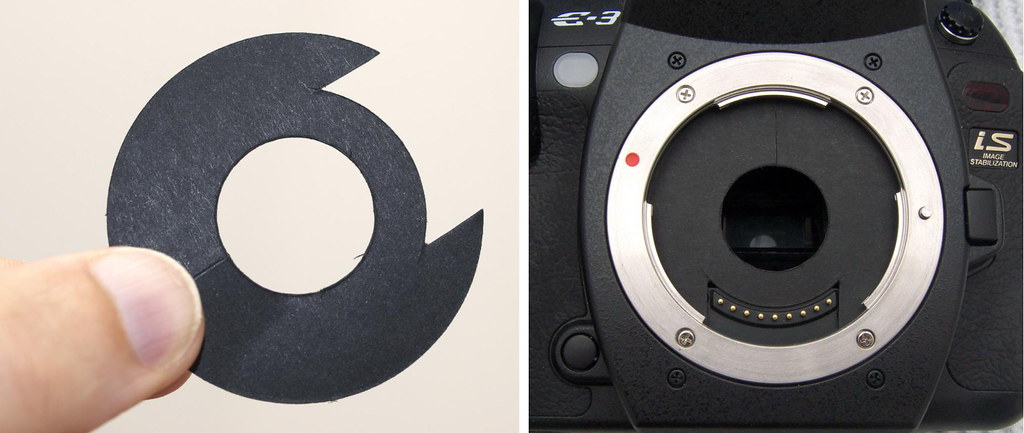
The original article (in Spanish) is here: http://www.flickr.com/groups/los_encamisados/discuss/72157623448839682/?search=camisa
Hope this helps.
Regards,
Jes.
_________________
Jesito, Moderator 
Jesito's backsack:
Zooms Sigma 70-300, Tamron 35-135 and 70-210 short, 70-210 long, 28-70 CF Macro, 35-70, 35-80, Vivitar 70-210 KA, Tamron 70-250.
Fixed Industar-50, , Tamron 24mm, Tamron 135mm, Sands Hunter 135mm, Pancolar 50mm, Volna-3, many Exakta lenses
DSLR SIGMA SD9 & SD14, EOS 5D, Sony A700 and NEXF3, Oly E-330, E-400, E-450, E-1
TLR/6x6/645 YashicaMat, Petri 6x45, Nettar, Franka Solida, Brilliant
SLR Minolta X300, Fuji STX II, Praktica VLC3, Pentax P30t, EXA500, EXA 1A, Spotmatic(2), Chinon CM-4S, Ricoh, Contax, Konica TC-X , Minolta 5000, 7000i, 3Sxi, EOS 500 and CX
Rangefinders Chinon 35EE, Konica C35 auto, Canonet 28, Yashica Lynx, FED-2, Yashica electro 35, Argus C3 & C4, Regula Cita III, Voigtlander Vitoret (many), Welta Welti-I, Kodak Signette 35, Zorki-4, Bessa-R & L, Minolta Weathermatic, olympus XA2
Compact Film Konica C35V, Voigtlander Vitorets, Canon Prima Super 105, Olympus XA2 and XA3
Compact Digital Olympus C-5050, Aiptek Slim 3000, Canon Powershot A540, Nikon 5200, SIGMA DP1s, Polaroid X530, IXUS55, Kodak 6490, Powershot G9 and G10
CSCCanon EOS-M, Samsung NX100 and NX210, Lumix G5, NEX-F3 |
|
| Volver arriba |
|
|
my_photography
Registrado: 03 Nov 2008
Mensajes: 2772
Ubicación: Pearl of the Orient
Expire: 2016-12-25
|
Publicado: Vie Mar 19, 2010 6:58 am Asunto: |
|
Publicado: Vie Mar 19, 2010 6:58 am Asunto: |
|
|
my_photography wrote:
Never occur to me one can cloth the opening. A neat idea. Thanks for sharing, Jes.
_________________
Zeiss: CJZ Flektogon 20/2.8, CJZ Flektogon 20/4, , CJZ Pentacon 29/2.8, CJZ Flektogon 35/2.4, CJZ Pancolar 50/1.8, Tessar 50/2.8, Biotar 7.5cm/1.5, CJZ Pancolar 80/1.8, CJZ Sonnar 135/3.5, CJZ Pentacon 135/2.8 CJZ Sonnar 200/2.8
Other Germany: Meyer Primoplan 50/1.8, Meyer Trioplan 100/2.8
Takumar: SMC 50/1.4 Super Tak 55/2, Super Tak 85/1.9, S-M-C 135/3.5, Super Tak 150/4
Russian: Zenith 16/2.8, Mir-24M 2/35, Volna-9 50/2.8, Helios 44M (58/2), Helios 44M-3 MC (58/2), Helios 40 (85/1.5), Tair 11A (135/2.8 )
Others: Sears 28/2.8, Sankor 35/2.8, Enna M�nchen Tele-Ennalyt 135/3.5
Zoom Sigma Zoom 28-85/3.5-4.5
|
|
| Volver arriba |
|
|
Jesito
Registrado: 24 Ago 2007
Mensajes: 5745
Ubicación: Olivella, Catalonia, (Spain)
Expire: 2015-01-07
|
Publicado: Vie Mar 19, 2010 7:37 am Asunto: |
|
Publicado: Vie Mar 19, 2010 7:37 am Asunto: |
|
|
Jesito wrote:
| my_photography escribió: |
| Never occur to me one can cloth the opening. A neat idea. Thanks for sharing, Jes. |
You're welcome. Differences are really signifiant whit lenses that have a bigger diameter than the sensor.
Regards.
Jes.
_________________
Jesito, Moderator
Jesito's backsack:
Zooms Sigma 70-300, Tamron 35-135 and 70-210 short, 70-210 long, 28-70 CF Macro, 35-70, 35-80, Vivitar 70-210 KA, Tamron 70-250.
Fixed Industar-50, , Tamron 24mm, Tamron 135mm, Sands Hunter 135mm, Pancolar 50mm, Volna-3, many Exakta lenses
DSLR SIGMA SD9 & SD14, EOS 5D, Sony A700 and NEXF3, Oly E-330, E-400, E-450, E-1
TLR/6x6/645 YashicaMat, Petri 6x45, Nettar, Franka Solida, Brilliant
SLR Minolta X300, Fuji STX II, Praktica VLC3, Pentax P30t, EXA500, EXA 1A, Spotmatic(2), Chinon CM-4S, Ricoh, Contax, Konica TC-X , Minolta 5000, 7000i, 3Sxi, EOS 500 and CX
Rangefinders Chinon 35EE, Konica C35 auto, Canonet 28, Yashica Lynx, FED-2, Yashica electro 35, Argus C3 & C4, Regula Cita III, Voigtlander Vitoret (many), Welta Welti-I, Kodak Signette 35, Zorki-4, Bessa-R & L, Minolta Weathermatic, olympus XA2
Compact Film Konica C35V, Voigtlander Vitorets, Canon Prima Super 105, Olympus XA2 and XA3
Compact Digital Olympus C-5050, Aiptek Slim 3000, Canon Powershot A540, Nikon 5200, SIGMA DP1s, Polaroid X530, IXUS55, Kodak 6490, Powershot G9 and G10
CSCCanon EOS-M, Samsung NX100 and NX210, Lumix G5, NEX-F3 |
|
| Volver arriba |
|
|
wilson.c
Registrado: 18 Ene 2010
Mensajes: 365
Ubicación: Hong Kong
|
Publicado: Vie Mar 19, 2010 9:29 am Asunto: |
|
Publicado: Vie Mar 19, 2010 9:29 am Asunto: |
|
|
wilson.c wrote:
Went back to the same tree and the same flower to do a follow-up test. I shot both RAW and JPG and disabled the Noise Reduction on my GF-1.
G45 - wide open, MFD from JPG, same funny bokeh

G45 - wide open, MFD from RAW, looks much better

G90 - wide open, MFD from JPG, same funny boken again. Sorry focus a bit out for these hand held shots.

G90 - wide open, MFD from RAW, bokeh looks more normal

Just out of curiosity I used my Canon FD 50mm Macro for the shots, wide open at f3.5 from the JPG there's still some of the funny bokeh there.

Canon FD 50 Macro - wide open from RAW

Looks like there's something happening in the GF-1's JPG conversion causing the highlight in the bokeh. Now to try this with some point light sources in the background.
Finally I got my 100/2.8 Makro-Planar from Lazzaros today. I figured I would toss the same shot in on my 500D. No funny bokeh action here!

_________________
Wilson
DMirrorless: Canon R5MkII, Sony a7CR, Hasselblad X2DII, 907X & CFV100C
DSLR: Canon 5DMkIV, 500D + Panasonic GF-1
SLR: Canon T90, Canon F1, Canon A1, Canon AE1 + Rolleiflex SL66 + Bronica ETRs
R'finder: Contax G1, G2 + Leica M6, M3 + Contax II
Lenses
M42: Angenieaux 90/1.8
Canon: FD 50/3.5 Macro, FD 80/1.8, FD 80-200L/4
Contax G: CZ Hologon 16/8, CZ Biogon 21/2.8, CZ Biogon 28/2.8, CZ Planar 45/2.0, CZ Sonnar 90/2.8
P-Six: CZJ Sonnar 180/2.8, CZJ Biometar 120/2.8
Contax: Distagon 28/2.8, Distagon 28/2, Planar 85/1.4, Makro-Planar 100/2.8
Others: CZ Sonnar 135/3.5 (Hasselblad V mount)
More little ones to be documented.
|
|
| Volver arriba |
|
|
poilu
Registrado: 26 Ago 2007
Mensajes: 10476
Ubicación: Greece
Expire: 2019-08-29
|
Publicado: Vie Mar 19, 2010 9:38 am Asunto: |
|
Publicado: Vie Mar 19, 2010 9:38 am Asunto: |
|
|
poilu wrote:
seems GF-1 developers didn't expect anybody would get bokeh with a m4:3 
_________________
T* |
|
| Volver arriba |
|
|
Orio
Registrado: 24 Feb 2007
Mensajes: 29545
Ubicación: West Emilia
Expire: 2012-12-04
|
Publicado: Vie Mar 19, 2010 10:54 am Asunto: |
|
Publicado: Vie Mar 19, 2010 10:54 am Asunto: |
|
|
Orio wrote:
My gawd, what a horrible camera JPG processing.
This should make everyone aware: never judge a lens on in-camera JPGs.
_________________
Orio, Administrator
T*
NE CEDE MALIS AUDENTIOR ITO
Ferrania film is reborn! http://www.filmferrania.it/
Support the Ornano film chemicals company and help them survive!
http://forum.mflenses.com/ornano-chemical-products-t55525.html |
|
| Volver arriba |
|
|
aleksanderpolo

Registrado: 24 Ene 2010
Mensajes: 684
|
Publicado: Vie Mar 19, 2010 3:23 pm Asunto: |
|
Publicado: Vie Mar 19, 2010 3:23 pm Asunto: |
|
|
aleksanderpolo wrote:
Thank you Wilson for figuring that out. I think I have also saw something similar with my FD's jpg output, but have been shooting raw since then so I haven't really noticed the problem.
Ya, Panny's jpg engine still have some way to go. I never quite figure out why they haven't fixed the pinkish sky and yellowish/greenish skin tone indoor. O well... I shoot raw so why do I care...
_________________
Panny GF1
Looking for: More articles to read
Current lens:
m4/3: 20/1.7; 14-45/3.5-5.6
C/Y: CZ 28/2.8; CZ 35/2.8; CZ 50/1.4
G: 45/2; 90/2.8
M: CV 35/1.4
Rollei: 50/1.8
m42: S-M-C Tak 50/1.4, Helios 44-2
F: AI 28/2; AIS 35/2; AIS 50/1.4; E 50/1.8
FL: 55/1.2
FD: Vivitar(Komine CF) 28/2; Kiron 28/2; nFD 50/1.4; nFD 35-105/3.5-4.5
AR: 40/1.8; 50/1.4; Adaptall 35-80/2.8-3.5
MD: Vivitar(Kiron) 24/2; MD 50/1.4
OM: 21/3.5; 24/2.8; 50/1.4; 135/3.5 |
|
| Volver arriba |
|
|
tkbslc

Registrado: 02 Jul 2009
Mensajes: 194
Ubicación: Utah, USA
|
Publicado: Vie Mar 19, 2010 4:52 pm Asunto: |
|
Publicado: Vie Mar 19, 2010 4:52 pm Asunto: |
|
|
tkbslc wrote:
That's terrible!
If reviewers and pixel peepers wouldn't get so hung up on a little noise, we wouldn't have these kinds of problems. I have always preferred a sharp, noisy picture, to a smooth, noise free, asbstract-painting look.
Can you just turn off NR when you shoot JPEG?
_________________
Canon 30D + some AF and MF lenses |
|
| Volver arriba |
|
|
egidio

Registrado: 02 Sep 2009
Mensajes: 222
Ubicación: slovenia
|
Publicado: Vie Mar 19, 2010 5:29 pm Asunto: |
|
Publicado: Vie Mar 19, 2010 5:29 pm Asunto: |
|
|
egidio wrote:
It was clearly post production problem. Try calibrate your camera with colorchecker and shoot RAW, colors would be much better, specially gradients.
_________________
I use: Flektogon 2.8/20, Flektogon 2.8/35, planar 50mm/1.4, Takumar 1.4/50mm, Takumar 1.9/85, MIR 24H, Mir1v, Industar-50-2, Helios-44-2, Pentacon 2.8/135, cyclop 85 1.5 |
|
| Volver arriba |
|
|
Kram

Registrado: 06 Feb 2010
Mensajes: 1344
Ubicación: Portland, OR
|
Publicado: Vie Mar 19, 2010 10:49 pm Asunto: |
|
Publicado: Vie Mar 19, 2010 10:49 pm Asunto: |
|
|
Kram wrote:
I always shoot in RAW.
That said, there is an optical phenomena where when one photographs a strong color against a contrasting background color a halo occurs. Can't remember what it's called. Obviously not the case here. |
|
| Volver arriba |
|
|
trifox
Registrado: 14 Mayo 2008
Mensajes: 3614
Ubicación: UK
Expire: 2014-05-29
|
Publicado: Dom Mar 21, 2010 6:40 pm Asunto: |
|
Publicado: Dom Mar 21, 2010 6:40 pm Asunto: |
|
|
trifox wrote:
that's an interesting finding!
thanks for sharing these pictures!
tf
_________________
Flickr.com |
|
| Volver arriba |
|
|
greg

Registrado: 21 Mar 2009
Mensajes: 683
Expire: 2012-12-03
|
Publicado: Dom Mar 21, 2010 8:40 pm Asunto: |
|
Publicado: Dom Mar 21, 2010 8:40 pm Asunto: |
|
|
greg wrote:
Hi,
Thanks for the link. Is there any way possible to have a translation regarding the size of the hole versus FL? I see the images on the website with captions that I believe to be what I mean.
The rest is pretty much self explanatory.
Thanks again for the link. |
|
| Volver arriba |
|
|
wilson.c
Registrado: 18 Ene 2010
Mensajes: 365
Ubicación: Hong Kong
|
Publicado: Lun Mar 22, 2010 12:46 am Asunto: |
|
Publicado: Lun Mar 22, 2010 12:46 am Asunto: |
|
|
wilson.c wrote:
I looked at the translation in Google. It did not mention size vs. FL.
http://translate.google.com/translate?u=http%3A%2F%2Fwww.flickr.com%2Fgroups%2Flos_encamisados%2Fdiscuss%2F72157623448839682%2F%3Fsearch%3Dcamisa&sl=es&tl=en&hl=&ie=UTF-8
_________________
Wilson
DMirrorless: Canon R5MkII, Sony a7CR, Hasselblad X2DII, 907X & CFV100C
DSLR: Canon 5DMkIV, 500D + Panasonic GF-1
SLR: Canon T90, Canon F1, Canon A1, Canon AE1 + Rolleiflex SL66 + Bronica ETRs
R'finder: Contax G1, G2 + Leica M6, M3 + Contax II
Lenses
M42: Angenieaux 90/1.8
Canon: FD 50/3.5 Macro, FD 80/1.8, FD 80-200L/4
Contax G: CZ Hologon 16/8, CZ Biogon 21/2.8, CZ Biogon 28/2.8, CZ Planar 45/2.0, CZ Sonnar 90/2.8
P-Six: CZJ Sonnar 180/2.8, CZJ Biometar 120/2.8
Contax: Distagon 28/2.8, Distagon 28/2, Planar 85/1.4, Makro-Planar 100/2.8
Others: CZ Sonnar 135/3.5 (Hasselblad V mount)
More little ones to be documented.
|
|
| Volver arriba |
|
|
|
|
 Español
 中文
 Magyar
 Русский
 Deutsch
 日本語
 Français